A Client Relationship Management System:The Structure That Keeps Progress From Slipping Through the Cracks
Structure your client relationships with the same discipline you apply to operations and finance. Watch ProofPoints in ActionTake the CRM Leak TestYour Team Is Busy.
Your Systems Aren’t Keeping Up.
You know that feeling. The day begins before you’re ready. Emails pile up overnight. Text messages from clients sit next to texts from vendors, friends, maybe even your mother. Voicemails wait in one system. Website form submissions sit in another. Somewhere, a spreadsheet is supposed to be holding it all together.
Your sales rep asks, “Did anyone follow up with that lead from last week?” Nobody’s sure. The original email is gone but the follow up conversation might be in someone’s email or in Slack or on a sticky note that fell behind a desk, never to be seen again.
The day isn’t even in full swing and a relatively new customer call about their project status. You put them on hold and start hunting through three different systems to find the timeline and the person who was supposed to be handling it. Meanwhile, the 14 other important things you needed to do today aren’t getting addressed.
This isn’t a people problem. Perhaps it was at some point but now it’s a structure problem. The information exists somewhere but it’s scattered across inboxes, text threads, spreadsheets and faulty memories. The more your business succeeds, the more difficult it gets to keep everything running.
A client relationship management system solves that problem. It provides the entire business one place to track conversations, manage follow-up and maintain continuity so momentum stays controlled instead of chaotic.
Businesses that use a CRM see an average return of
$8.71 for every $1 spent.
What a Client Relationship Management (CRM) System Does
A client relationship management system is a centralized way to organize customer conversations, interaction history and next steps across the entire business.
Instead of relying on isolated systems or someone’s memory, a CRM keeps context shared and accessible. Everyone involved can see what’s happened, what’s in progress and what needs attention next. For organizations of any size, this isn’t about tracking people. It’s about protecting relationships as volume increases.
Conversion rates can increase by up
to 300 percent when a CRM is used well.
Why Businesses Hit a Breaking Point Without One
In the early stages, legacy systems held up fine. The company founder was completely hands on and involved enough to remember just about every conversation. It was easier to address the follow-ups and nothing slipped very far before it was identified and reeled back into the mix.
As expansion and evolution occurs, the balance shifts as staff multiplies, inbound inquiries get more frequent and revenue increases. That is when the fun really starts. Search queries begin to multiply and the pace picks up even more. Website and landing pages generate inquiries which, when handled well, produce more leads and customers. After a fashion, the focus on getting good reviews is promoting more trust which leads to an uptick in referrals. The conversations that real people – your customers, competitors and naysayers – start in more places and at different times of day or night.
The volume isn’t overwhelming yet. But it’s no longer predictable.
That’s when the cracks appear in the smallest ways. Messages get delayed or do not reach the intended party. Context of the project disappears between department handoffs and soon customers begin to sense the inconsistency even when intentions are good. Forward motion doesn’t stop, but it becomes harder to manage with confidence.
Many businesses adopt a CRM at this stage not to accelerate, but to prevent momentum from breaking down.
65 percent of companies report better
cross-team collaboration after implementing a CRM.
How does your customer
management strategy stack up?
How a CRM Strengthens
Customer Relationships
Strong relationships depend on continuity, not just in sales and marketing, but across every department.
When a customer reaches out, they expect you to remember who they are, what they asked the last time and what was promised. As the business scales, expectations becomes harder to meet especially when the fires demand attention. The loyal customers who keep the lights on quietly take a backseat to the loudest complaints. It’s the 80/20 rule playing out in real time.
A client relationship management system preserves that context so conversations move forward instead of starting over. Prioritize the people who matter most to your bottom line instead of spreading attention thin across every incoming demand.
With a solid CRM in place, departments become more prepared to handle the waves of inquiries. Customers feel recognized. Trust builds because the experience feels consistent, not because anyone made a heroic effort to remember.
This becomes especially important as your digital presence strengthens through services like SignalSync. As more people discover your business, the CRM ensures every interaction reflects the same level of care, regardless of where it started.
CRM adoption boosts customer lifetime value by
30 percent and improves retention by 27 percent.
Why a CRM Matters for Small
and Mid-Sized Businesses
Small and mid-sized organizations often delay adopting a CRM because they assume it’s built for large sales teams. That assumption is wrong.
What makes a CRM necessary isn’t company size. It’s the volume of activity. As communications increase and demand rises, it becomes impossible for one person to manage every relationship personally or efficiently. That is when delegation becomes essential, but delegation without shared framework creates risk.
A client relationship management system allows businesses to scale without losing quality. It supports handoffs, preserves standards and ensures customers receive consistent attention even as the team expands.
This isn’t about becoming more corporate. It’s about becoming more dependable.
A CRM vs. Managing Relationships Across Multiple Tools
Email, calendars, notes, spreadsheets and messaging apps all serve a purpose. The problem is that they don’t connect.
When information is found in too many places, no one has the full picture. Time gets wasted searching for the message or asking questions that have already been answered. Relying on updates instead of shared access is a losing approach.
A CRM replaces that fragmentation with a single point of reference for relationships, conversations and follow-through. Instead of guessing what happened, the answer is there.
CRM usage increases sales by 29 percent,
sales productivity by 34 percent
and forecast accuracy by 42 percent.
How a CRM Supports Your Reputation and Follow-Through
When your search presence, local listings, reviews and social channels begin driving more engagement, conversations multiply fast. Without structure behind the scenes, that attention creates pressure and frustration for your customers.
A client relationship management system ensures that every inquiry receives a response, every review is acknowledged and every conversation carries forward with context.
This is what it looks like in practice: website form leads get followed up the same day. A social media DM that came in at 2 AM gets a prompt response the next morning. A three-star review receives the appropriate reply and, if needed, a support follow-up.
The formula is simple. Discovery creates activity. A healthy CRM makes that activity manageable.
How a CRM Supports Learning and Better Decisions
Communications improve when businesses understand how their customers respond.
A CRM makes patterns apparent. It shows which inquiries convert, where conversations stall and which follow-ups lead to stronger outcomes. Over time, these patterns support smarter adjustments instead of repeated guesswork.
When paired with a learning framework like B.A.R.K., your CRM becomes even more useful. There is now a common understanding of the company’s message, who your ideal customers are, where conversations about your brand happen, how competitors position themselves, which channels produce the best results and how to measure the effectiveness of your outreach.
Information becomes insight. Insight becomes direction.
What Is ProofPoints?
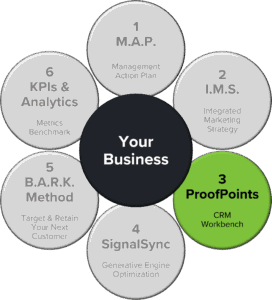
ProofPoints is the client relationship management system built to do exactly what this page describes, and more.
Every call, message, note and task resides in one clean timeline. Automated workflows carry the follow-up forward. Reporting shows what drives outcomes, not vanity numbers. ProofPoints is the system you learn and use quickly without needing an IT department to make it happen.
ProofPoints isn’t just where you track contacts. It’s where management, sales, service and marketing run the day with confidence instead of stress.
A Day in the Life: Before and After ProofPoints
Before ProofPoints: The Morning Scramble
7:45 a.m.The day starts with a pile of emails sitting in your inbox and texts on your personal cell phone. Messages from clients, friends, and vendors all mixed together sit waiting on your phone. Voicemails on the office phone systems blink wildly. Yesterday’s website form submissions are somewhere in a spreadsheet, waiting for someone to manually address each one.
8:30 a.m. Your sales rep asks, “Did anyone follow up with the lead from last week?” No one’s sure. The conversation might have been addressed by the Salesperson you just let go or the new Customer Service Rep. Was it added to the project management system? Monday or Asana? You forget; there have been so many.
10:00 a.m. A client calls asking about an update on their order, but there is no record of it being placed. The customer waits while your frustration compounds.
12:00 p.m. Someone was supposed to send a proposal yesterday. It didn’t happen because the reminder was in someone’s head, and they got busy chasing down a vendor response. Now the lead is annoyed and likely considering a competitor, though you don’t know that because no one has followed up.
2:00 p.m. Operations needs to know which customers are due for check-ins this week. There’s no central list. There never has been. Everyone maintains their own version in a different format, and more than half the check-ins get missed.
4:30 p.m. You try to review the sales numbers. The data lives in several separate systems. Pulling reports means copying information from five places into a spreadsheet by hand. It takes 45 minutes, and you’re still not confident the numbers are right.
6:00 p.m. You leave feeling like you put in a full day, but know it wasn’t productive. The team tried hard, but nothing felt smooth. Tomorrow will be the same.
After ProofPoints: The Day Flows
7:45 a.m. Every email, text, form submission, and voicemail flows into ProofPoints automatically. Everything is tagged, organized, and assigned before you log in. Everyone sees the same information.
8:30 a.m. Your sales rep opens ProofPoints and sees exactly who needs follow-up today. The lead from last week is flagged with a reminder. One click shows the full conversation history. The rep reaches out confidently, knowing where things stand.
10:00 a.m. A customer calls about their order. You pull up their profile in seconds. Every note, timeline, and department involved is right there. You give a confident update without putting them on hold. The customer thanks you for being organized.
12:00 p.m. The proposal that was supposed to go out yesterday? ProofPoints sent an automated reminder at 4 p.m. the day before. The rep sent it that evening. The lead is happy. The deal is moving forward.
2:00 p.m. Operations opens its dashboard. ProofPoints lists every customer due for a check-in this week with suggested talking points based on past interactions. No one gets missed. Outreach feels personal, not robotic.
4:30 p.m. You pull a performance report. One click. ProofPoints shows how many leads came in, how fast your team responded, which deals moved forward, where things slowed down, and what messaging performed best. The report is accurate and complete, and it took 90 seconds.
5:00 p.m. You leave earlier than usual, feeling organized and in control. Your team was efficient and coordinated. Tomorrow will be better because the system is learning and improving with you.
The Difference Is Structure
Before ProofPoints, your team operated in a void because the systems didn’t connect and neither did the people.
After ProofPoints, your team operates in harmony because everything lives in one place, automations carry the follow-up forward and nothing falls through the cracks.
The business didn’t change. The system did.
Moving to ProofPoints Without Disrupting Your Business
What Happens to Your Existing Data
Your contacts, conversations and history come with you. We map your current CRM structure to ProofPoints so nothing important disappears. Customer records, notes, communication history and key details transfer cleanly.
How We Handle Your Current Tools
We start by understanding what you use today and why. Then we show you how ProofPoints replaces or connects with those tools. Teams typically consolidate four to seven platforms into one. That means fewer logins, fewer bills and fewer places where information can hide.
If you have tools that need to stay, like accounting software or industry-specific systems, we can typically integrate them so data flows without manual re-entry.
Training That Sticks
We don’t hand you a manual and disappear. Training happens by role, so people learn what they need for their specific jobs. Sales sees sales workflows. Service sees service workflows. Leadership sees reporting and dashboards.
Each session is short, practical and focused on the tasks your team does every day. We record everything so new hires or anyone needing a refresher can watch later.
Support When You Need It
During migration and for weeks after, you have direct access to our team. Questions get answered fast. Problems get resolved immediately. After the initial integration, your team has 24/7 online support, live chat and, if needed, a scheduled Support Level Zoom call.
As your team settles in, you still have support. But by then, most questions disappear because ProofPoints is built to make sense from day one.
The Migration Timeline
Migration doesn’t mean losing time or data. We move in phases.
Planning and Setup
Weeks 1 to 2: We map your workflows, configure ProofPoints to match how your business operates and prepare your data for transfer.
Data Migration and Testing
Weeks 2 to 3: Your contacts, history and automations move into ProofPoints. We test everything before your team touches it.
Team Training and Rollout
Weeks 3 to 4: Your team learns ProofPoints in small groups, by role. We start with power users, then expand to the full team. Everyone gets hands-on practice in a safe environment.
Live Operation with Support
Week 4 and Beyond: You go live. We stay close during the first few weeks, ready to answer questions and resolve friction fast.
What Makes ProofPoints Easier to Adopt Than Other Systems?
ProofPoints is designed for humans, not IT departments. The interface makes sense. The layout and visual mechanics match how people operate in the real world. No jargon. No buried settings. No 47-step processes to complete simple tasks.
Companies adopt ProofPoints faster because it feels familiar from the start, even though it’s much more capable than what they used before.
Where SignalSync and B.A.R.K. Plug Into Your CRM
SignalSync: Helping People Find You
When They’re Ready to Act
SignalSync improves how your business appears wherever customers search: Google, Maps, AI answers, local listings and directories.
When someone is looking for what you offer, SignalSync helps you show up with consistent, accurate information that builds trust on contact. Every click, call, text or booking flows back into your CRM.
SignalSync brings in qualified, intent-ready traffic. ProofPoints organizes the relationship and moves it forward. They run as one engine.
B.A.R.K.: Making Sure Your Message
Resonates With the Right People
B.A.R.K. defines four things: your brand voice, your audience segments, your reach strategy and the knowledge you need to improve.
Inside ProofPoints, B.A.R.K. becomes the backbone for smart segmentation and relevant automation sequences. Right message. Right person. Right moment.
That’s how leads become customers and customers become loyal advocates.
ProofPoints Plans
Three levels. One mission.
Give your business a system that supports progress every day.

Spark Plan:
Your Organized Foundation
Spark is for teams ready to leave inbox chaos behind and run their day from one clean CRM. You get the essentials: one place to track every customer conversation, reminders and follow-ups that fire on schedule, shared access so everyone knows what’s happening and a simple, reliable process that reduces mistakes.
Spark brings order without adding complexity. If your goal is to stop losing track of people and start responding with consistency, this is your starting point.

Surge Plan:
Your Engine
for Momentum
Surge is for businesses that want more opportunities and want them managed well. Leads come in and the CRM sorts them automatically. Nurturing sequences keep people warm without constant manual effort. Your team sees who’s ready for action and who needs a nudge. Campaigns become trackable, repeatable and easier to improve. Your website and funnels feed the CRM with clean, organized data.
Surge moves you past random acts of marketing into intentional, measurable progress.

Soar Plan:
Your Connected Ecosystem
Soar is for organizations that want deeper relationships, recurring revenue and a home base for their customers or members. Run memberships or loyalty programs. Deliver courses, resources and exclusive content. Build community spaces your audience returns to. Automate behavior-based workflows that keep engagement high.
Soar is ideal for associations, creators, coaches, educators and brands building long-term connection. It transforms your business from transactional to relational.
What All Plans Include
No matter where you start, you get guided setup, essential workflows, launch support, human guidance and a CRM your whole team can use. Later, you can layer on advanced automations, SignalSync, B.A.R.K. upgrades and website enhancements..
Clearing Up Common Misconceptions
Some believe a CRM is only for sales teams. In practice, it supports every function that touches a customer: service, management, operations, marketing, administration, logistics, fulfillment and sales. No exceptions.
Others assume CRMs are too complex for smaller organizations. The opposite is true. Most complexity comes from juggling disconnected tools, not from having one shared system. Two people can still hear the same conversation differently. A CRM makes sure they’re reading from the same record.
Some worry a CRM replaces personal relationships. It doesn’t. It protects them. Think about how much more useful every customer interaction becomes when prior conversations, purchases, issues and concerns are easily accessible before picking up the phone.
Who ProofPoints Is Built For
ProofPoints fits best with teams who are overwhelmed by too many tools, tired of inconsistent follow-up, ready to run from one system, focused on building relationships instead of chasing tasks, using B.A.R.K. to sharpen messaging and amplifying their presence through SignalSync.
If your goal is to create order, follow through and deliver a consistent customer experience, you’re in the right place.
What Makes a CRM System Worth Using
A useful client relationship management system doesn’t overwhelm your infrastructure or your people with features nobody asked for and learning curves nobody has time for.
It should be easy to adopt, straightforward to navigate and reliable in daily use. It supports follow-up with timely reminders and provides shared access without requiring endless reporting.
The goal is simple. No relationship should depend on memory alone.
Customer relationships require nurturing. Without it, even a strong foundation becomes unstable. A client relationship management system protects those relationships by ensuring consistency and continuity as volume increases. Your people and departments keep pace rather than fall behind.
ProofPoints supports the momentum created by strategy, outreach, and discovery by making sure the follow-through gets completed.
When customers feel remembered and supported, business becomes steadier, calmer and easier to sustain.
On average, a CRM returns five to ten hours per rep per week, lifts sales 29 to 41 percent, improves forecast accuracy by 42 percent and cuts missed-deal risk by surfacing at-risk opportunities in time to act.
Client Relationship Management System FAQs
What is a client relationship management system?
A client relationship management system is a centralized way to track conversations, follow-ups and customer history in one place. It helps businesses stay organized, respond consistently and maintain continuity as the number of relationships increases.
How does a client relationship management system help small businesses?
Small businesses use a CRM to reduce reliance on memory, keep track of conversations across channels and ensure follow-ups happen on time. It allows teams to scale without losing the personal touch customers expect.
When should a business start using a CRM?
When inquiries begin arriving from multiple places and it becomes difficult to reliably remember who needs a response or follow-up. That moment usually appears before things feel overwhelming, not after.
Is a client relationship management system only for sales teams?
No. While sales teams often use CRMs, the system supports anyone involved in customer relationships. Service, support, leadership and operations all benefit from shared context and access to conversations and commitments.
How does a CRM improve customer retention?
A CRM improves retention by preserving customer history, supporting timely follow-up and ensuring consistent communication. When customers feel recognized and supported, they’re more likely to return.
Can a CRM manage leads from landing pages and social media?
Yes. A client relationship management system captures inquiries from landing pages, social platforms and other channels so they’re followed up without delay. This prevents missed opportunities as your digital presence expands.
How does a CRM support reviews and reputation management?
A CRM provides context around customer interactions so teams can respond to reviews thoughtfully and follow up when feedback signals an opportunity or concern. Consistent engagement strengthens trust over time.
Is a CRM complicated to use?
A CRM creates structure around relationships. It helps businesses handle more conversations, learn from patterns and maintain quality as volume increases, without burning out teams or dropping the ball.
How does a CRM support long-term business progress?
A CRM creates structure around relationships. It helps businesses handle more conversations, learn from patterns and maintain quality as volume increases, without burning out teams or dropping the ball.
Want to see if ProofPoints
is the right fit for your organization?
Our Promise
To build, and protect, the integrity and trust of the brands that we serve.
Call: 888.515.2789
Text: 614.665.1992
Email: info@efriendmarketing.com
OH Office: 8711 Arrowtip Lane • Lewis Center, Ohio 43035
CT Office: 32 Horseshoe Ridge Rd • Sandy Hook, CT 06482